 站長資訊網
站長資訊網
本篇文章給大家帶來了關于Vue布局的相關知識,其中主要給大家總結介紹Vue是怎么利用flex布局來實現TV端城市列表效果的,非常全面詳細,下面一起來看一下,希望對需要的朋友有所幫助。
Vue利用flex布局實現TV端城市列表
vue中城市列表和搜索很常見,這篇博客就來說說咋實現搜索和城市列表
1.實現搜索布局代碼:
<div class="search-bar"> <input class="search-input" v-model="citySearchResult" :placeholder="searchDefault" :key="searchTitle" @endEditing="endEditing" :focusable="true" ref="searchInput" :duplicateParentState="true" :enableFocusBorder="true"/> <img class="index-root-search-image-view-css" :src="searchIcon"> <span class="index-root-search-text-view-css" ref="textViewCity">{{searchDefaultKeyWord}}</span> </div>
登錄后復制
2.搜索布局css樣式代碼:
.search-bar-root { display: flex; flex-direction: column; align-items: center; justify-content: center; margin-top: 140px; }.index-root-search-title-css { flex-direction: column; align-items: center; justify-content: center; margin-bottom: 40px; }.search-bar-root .search-bar { background-color: #ffffff; width: 1000px; height: 100px; display: flex; justify-content: center; border-radius: 8px; }.search-input { width: 780px; border-radius: 8px; font-size: 36px; font-family: PingFangSC-Regular, PingFang SC; font-weight: 400; color: #000000; margin-left: 40px; text-indent: 40px; }.index-root-search-image-view-css { position: absolute; width: 32px; height: 32px; top: 35px; bottom: 35px; right: 0; margin-right: 102px; text-align: center; }.index-root-search-flex-view-css { display: flex; flex-wrap: wrap; flex-direction: row; width: 1450px; margin-left: 245px; margin-right: 245px; margin-top: 40px; }.index-root-search-text-view-css { font-size: 30px; font-family: PingFangSC-Regular, PingFang SC; color: #000000; text-align: center; font-weight: 400; top: 0; bottom: 0; right: 0; position: absolute; margin-right: 30px; }.index-root-search-title-text-view-css { font-size: 70px; font-family: PingFangSC-Regular, PingFang SC; color: #ffffff; text-align: center; opacity: 1.0; }.search-city-button-view-css { width: 270px; height: 100px; background-color: rgba(0, 0, 0, .1); margin-right: 20px; margin-top: 40px; border-radius: 11px; border-width: 2px; border-color: rgba(255, 255, 255, 0.1); focus-background-color: #fff; }.search-city-button-view-css .city-sel-box { border-width: 2px; border-color: #32C5FF; }
登錄后復制
3.城市列表布局代碼:
<div class="index-root-search-flex-view-css" :clipChildren="false" ref="citySearch"> <div class="search-city-button-view-css" v-for="(item,cityId) in hotCity" :focusable="true" :key="cityId" :ref="`hotRef${cityId}`" @focus="onFocus" :clipChildren="false"> <div class="icon-location-reactive" ref="searchLocation" :duplicateParentState="true" style="visibility: visible;margin-right: 20px" v-if="showHot && cityId===0"> <img src="@/assets/location.png" alt="" class="icon-location" showOnState="normal"> <img src="@/assets/location_hot_focus.png" alt="" class="icon-location" showOnState="focused"> </div> <span class="search-city-hot-text-iew-css" :duplicateParentState="true" showOnState="focused" ref="searchHotSelected" :style="{focusColor: focusHotTextColor,fontSize: textFontSize,fontWeight: textFontWeight,}">{{item.cityName}}</span> </div>
登錄后復制
4.城市列表css樣式代碼:
.index-root-search-flex-view-css { display: flex; flex-wrap: wrap; flex-direction: row; width: 1450px; margin-left: 245px; margin-right: 245px; margin-top: 40px; }.index-root-search-text-view-css { font-size: 30px; font-family: PingFangSC-Regular, PingFang SC; color: #000000; text-align: center; font-weight: 400; top: 0; bottom: 0; right: 0; position: absolute; margin-right: 30px; }.index-root-search-title-text-view-css { font-size: 70px; font-family: PingFangSC-Regular, PingFang SC; color: #ffffff; text-align: center; opacity: 1.0; }.search-city-button-view-css { width: 270px; height: 100px; background-color: rgba(0, 0, 0, .1); margin-right: 20px; margin-top: 40px; border-radius: 11px; border-width: 2px; border-color: rgba(255, 255, 255, 0.1); focus-background-color: #fff; }.search-city-button-view-css .city-sel-box { border-width: 2px; border-color: #32C5FF; }.icon-location-reactive { position: absolute; width: 26px; height: 34px; margin-left: 60px; margin-top: 30px; margin-bottom: 30px; }.icon-location { width: 26px; height: 34px; position: absolute; left: 0; top: 0; z-index: 9; }.search-city-hot-text-iew-css { width: 270px; height: 100px; background-color: rgba(50, 197, 255, 0.1); border-radius: 11px; border: 2px solid #32C5FF; font-size: 36px; font-family: PingFangSC-Regular, PingFang SC; text-align: center; color: white; }.search-city-empty { margin-top: 40px; width: 425px; display: flex; align-items: center; justify-content: center; flex-direction: column; margin-left: 535px; }.search-city-empty .icon-no-connect { width: 425px; height: 307px; }.search-city-empty .empty-txt { font-size: 32px; font-family: PingFangSC-Light, PingFang SC; font-weight: 300; color: #FFFFFF; margin-top: 60px; }
登錄后復制
5.城市列表獲取焦點的事件:
主要是在div設置:focusable="true"和@focus="onFocus"
<div class="search-city-button-view-css" v-for="(item,cityId) in hotCity" :focusable="true" :key="cityId" :ref="`hotRef${cityId}`" @focus="onFocus" :clipChildren="false"> <div class="icon-location-reactive" ref="searchLocation" :duplicateParentState="true" style="visibility: visible;margin-right: 20px" v-if="showHot && cityId===0"> <img src="@/assets/location.png" alt="" class="icon-location" showOnState="normal"> <img src="@/assets/location_hot_focus.png" alt="" class="icon-location" showOnState="focused"> </div>
登錄后復制
6.設置焦點背景顏色和字體效果:
主要是設置:duplicateParentState="true"當文本獲得焦點時顏色不受父布局影響,還可以設置焦點放大和帶邊框效果
:enableFocusBorder="true"//設置獲得焦點時的邊框 :focusScale="1.0"//設置焦點放大時的倍數
登錄后復制
焦點效果的樣式::style="{focusColor: focusHotTextColor,fontSize: textFontSize,fontWeight: textFontWeight,}
<span class="search-city-hot-text-iew-css" :duplicateParentState="true" showOnState="focused" ref="searchHotSelected" :style="{focusColor: focusHotTextColor,fontSize: textFontSize,fontWeight: textFontWeight,}">{{item.cityName}}</span>
登錄后復制
7.搜索框輸入事件:
//輸入內容之后請求城市列表接口刷新數據 endEditing(e) { console.log("--resultData--", this.citySearchResult) },
登錄后復制
8.搜索框獲取焦點的事件:
onFocus(e) { this.focused = e.isFocused; this.$emit("onButtonFocused", e.isFocused); },
登錄后復制
9.默認彈出TV軟鍵盤:
mounted() { this.hotCity = hotCity; this.showHot = true; this.pageLoading = true //彈出軟鍵盤 this.$refs.searchInput.focus() //搜索框默認獲取焦點 this.setHideLoading() },
登錄后復制
10.完整代碼如下:
<template> <div class="index-root-search-view-css" :clipChildren="false"> <img class="search-background-view-css" :src="searchImageData"/> <div class="search-bar-root"> <div class="index-root-search-title-css"> <span class="index-root-search-title-text-view-css"> {{ searchTitle }}</span> </div> <div class="search-bar"> <input class="search-input" v-model="citySearchResult" :placeholder="searchDefault" :key="searchTitle" @endEditing="endEditing" :focusable="true" ref="searchInput" :duplicateParentState="true" :enableFocusBorder="true"/> <img class="index-root-search-image-view-css" :src="searchIcon"> <span class="index-root-search-text-view-css" ref="textViewCity">{{searchDefaultKeyWord}}</span> </div> <div class="index-root-search-flex-view-css" :clipChildren="false" ref="citySearch"> <div class="search-city-button-view-css" v-for="(item,cityId) in hotCity" :focusable="true" :key="cityId" :ref="`hotRef${cityId}`" @focus="onFocus" :clipChildren="false"> <div class="icon-location-reactive" ref="searchLocation" :duplicateParentState="true" style="visibility: visible;margin-right: 20px" v-if="showHot && cityId===0"> <img src="@/assets/location.png" alt="" class="icon-location" showOnState="normal"> <img src="@/assets/location_hot_focus.png" alt="" class="icon-location" showOnState="focused"> </div> <span class="search-city-hot-text-iew-css" :duplicateParentState="true" showOnState="focused" ref="searchHotSelected" :style="{focusColor: focusHotTextColor,fontSize: textFontSize,fontWeight: textFontWeight,}">{{item.cityName}}</span> </div> <div class="search-city-empty" v-if="hotCity.length === 0"> <img src="@/assets/no_content.png" alt="" class="icon-no-connect"/> <p class="empty-txt">沒有搜索結果~</p> </div> </div> </div> <loading-view style="width: 100px;height: 100px;position: absolute;left:960px;right:960px;top:500px;bottom:500px;align-self: center;align-items: center;justify-content: center" v-show="pageLoading"/> </div></template><script>import searchImage from "@/assets/search_focus.png";import searchBackGroundImage from "@/assets/index-bg-qing.jpg";import {hotCity} from '@/views/contsants';import {ESLaunchManager} from "@extscreen/es-core";export default { name: "city_list", props: { searchKeyWord: { type: String, default: '', }, focusTextColor: { type: String, default: '#000000' }, focusHotTextColor: { type: String, default: '#00EFFF' }, textColor: { type: String, default: '#FFFFFF' }, textFontSize: { type: String, default: '30px' }, textFontWeight: { type: Number, default: 400 }, focusBackground: { orientation: 'TL_BR',//TOP_BOTTOM,TR_BL, RIGHT_LEFT, BR_TL, BOTTOM_TOP,BL_TR,LEFT_RIGHT,TL_BR, cornerRadius: [40, 40, 40, 40], normal: ['#00000000', '#00000000'], focused: ['#F5F5F5', '#F5F5F5'], }, }, data() { return { pageLoading: false, text: 'search city', search: '', searchIcon: searchImage, searchImageData: searchBackGroundImage, searchTitle: "切換城市", searchDefaultKeyWord: '搜索', searchDefault: '請輸入城市名稱首字母或全拼', focusColor: '#f5f5f5', citySearchResult: "", hotCity: [], cityName: "", cityId: "", showHot: true, params: '', } }, activated() { }, deactivated() { this.resetModel() }, mounted() { this.hotCity = hotCity; this.showHot = true; this.pageLoading = true //彈出軟鍵盤 this.$refs.searchInput.focus() //搜索框默認獲取焦點 this.setHideLoading() }, methods: { setHideLoading() { setTimeout(() => { this.pageLoading = false }, 500) }, onFocus(e) { this.focused = e.isFocused; this.$emit("onButtonFocused", e.isFocused); }, //輸入內容之后請求城市 endEditing(e) { console.log("--resultData--", this.citySearchResult) }, onBackPressed() { ESLaunchManager.finishESPage(); }, resetModel() { this.citySearchResult = ""; this.hotCity = []; this.pageLoading = false; this.searchTitle = ""; this.searchDefaultKeyWord = ""; this.searchDefault = ""; }, } }</script><style scoped>.index-root-search-view-css { width: 1920px; height: 1080px; background-color: transparent; }.search-background-view-css { position: absolute; left: 0; top: 0; right: 0; bottom: 0; background-color: transparent; }.search-bar-root { display: flex; flex-direction: column; align-items: center; justify-content: center; margin-top: 140px; }.index-root-search-title-css { flex-direction: column; align-items: center; justify-content: center; margin-bottom: 40px; }.search-bar-root .search-bar { background-color: #ffffff; width: 1000px; height: 100px; display: flex; justify-content: center; border-radius: 8px; }.search-input { width: 780px; border-radius: 8px; font-size: 36px; font-family: PingFangSC-Regular, PingFang SC; font-weight: 400; color: #000000; margin-left: 40px; text-indent: 40px; }.index-root-search-image-view-css { position: absolute; width: 32px; height: 32px; top: 35px; bottom: 35px; right: 0; margin-right: 102px; text-align: center; }.index-root-search-flex-view-css { display: flex; flex-wrap: wrap; flex-direction: row; width: 1450px; margin-left: 245px; margin-right: 245px; margin-top: 40px; }.index-root-search-text-view-css { font-size: 30px; font-family: PingFangSC-Regular, PingFang SC; color: #000000; text-align: center; font-weight: 400; top: 0; bottom: 0; right: 0; position: absolute; margin-right: 30px; }.index-root-search-title-text-view-css { font-size: 70px; font-family: PingFangSC-Regular, PingFang SC; color: #ffffff; text-align: center; opacity: 1.0; }.search-city-button-view-css { width: 270px; height: 100px; background-color: rgba(0, 0, 0, .1); margin-right: 20px; margin-top: 40px; border-radius: 11px; border-width: 2px; border-color: rgba(255, 255, 255, 0.1); focus-background-color: #fff; }.search-city-button-view-css .city-sel-box { border-width: 2px; border-color: #32C5FF; }.icon-location-reactive { position: absolute; width: 26px; height: 34px; margin-left: 60px; margin-top: 30px; margin-bottom: 30px; }.icon-location { width: 26px; height: 34px; position: absolute; left: 0; top: 0; z-index: 9; }.search-city-hot-text-iew-css { width: 270px; height: 100px; background-color: rgba(50, 197, 255, 0.1); border-radius: 11px; border: 2px solid #32C5FF; font-size: 36px; font-family: PingFangSC-Regular, PingFang SC; text-align: center; color: white; }.search-city-empty { margin-top: 40px; width: 425px; display: flex; align-items: center; justify-content: center; flex-direction: column; margin-left: 535px; }.search-city-empty .icon-no-connect { width: 425px; height: 307px; }.search-city-empty .empty-txt { font-size: 32px; font-family: PingFangSC-Light, PingFang SC; font-weight: 300; color: #FFFFFF; margin-top: 60px; }</style>
登錄后復制
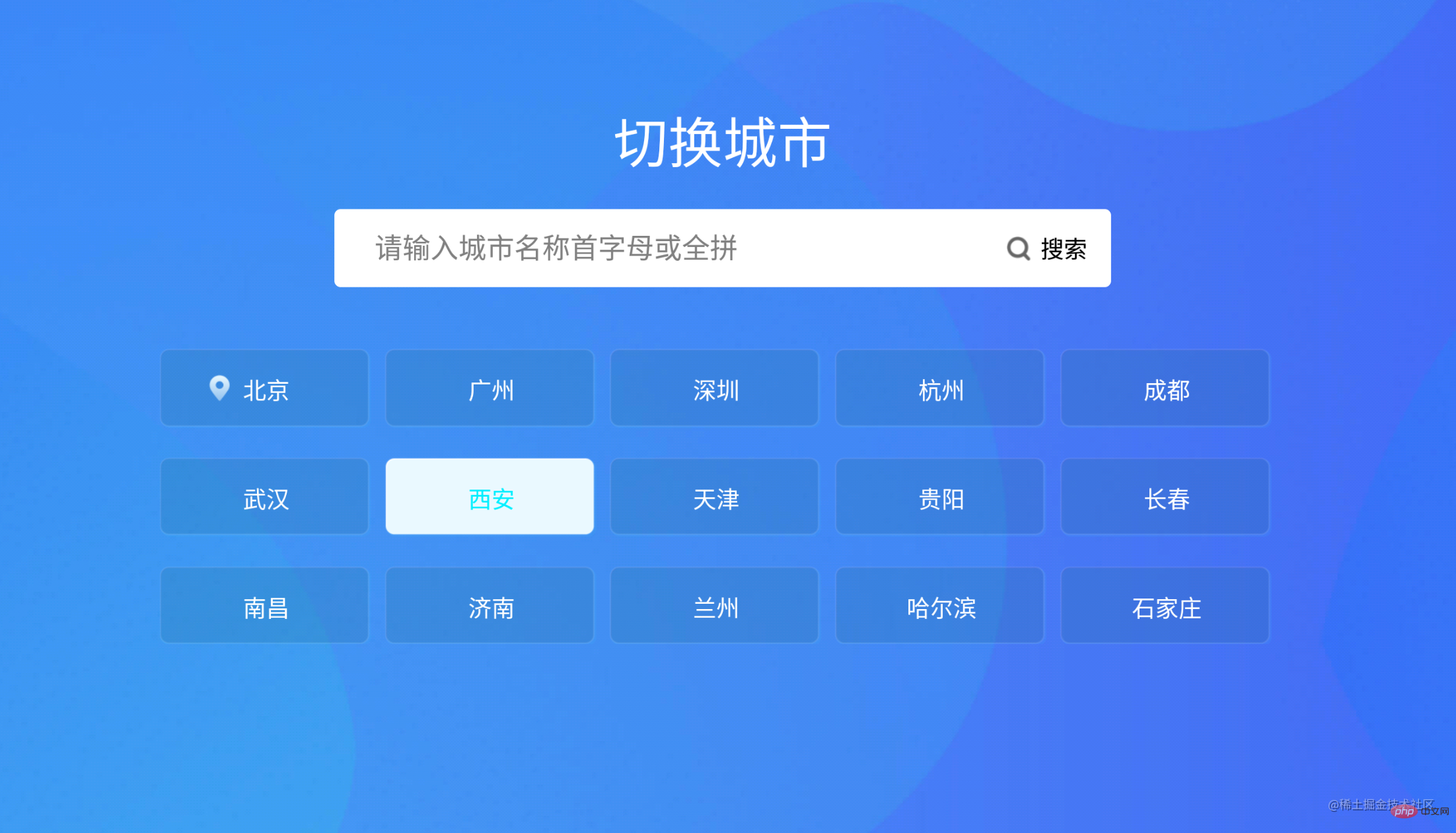
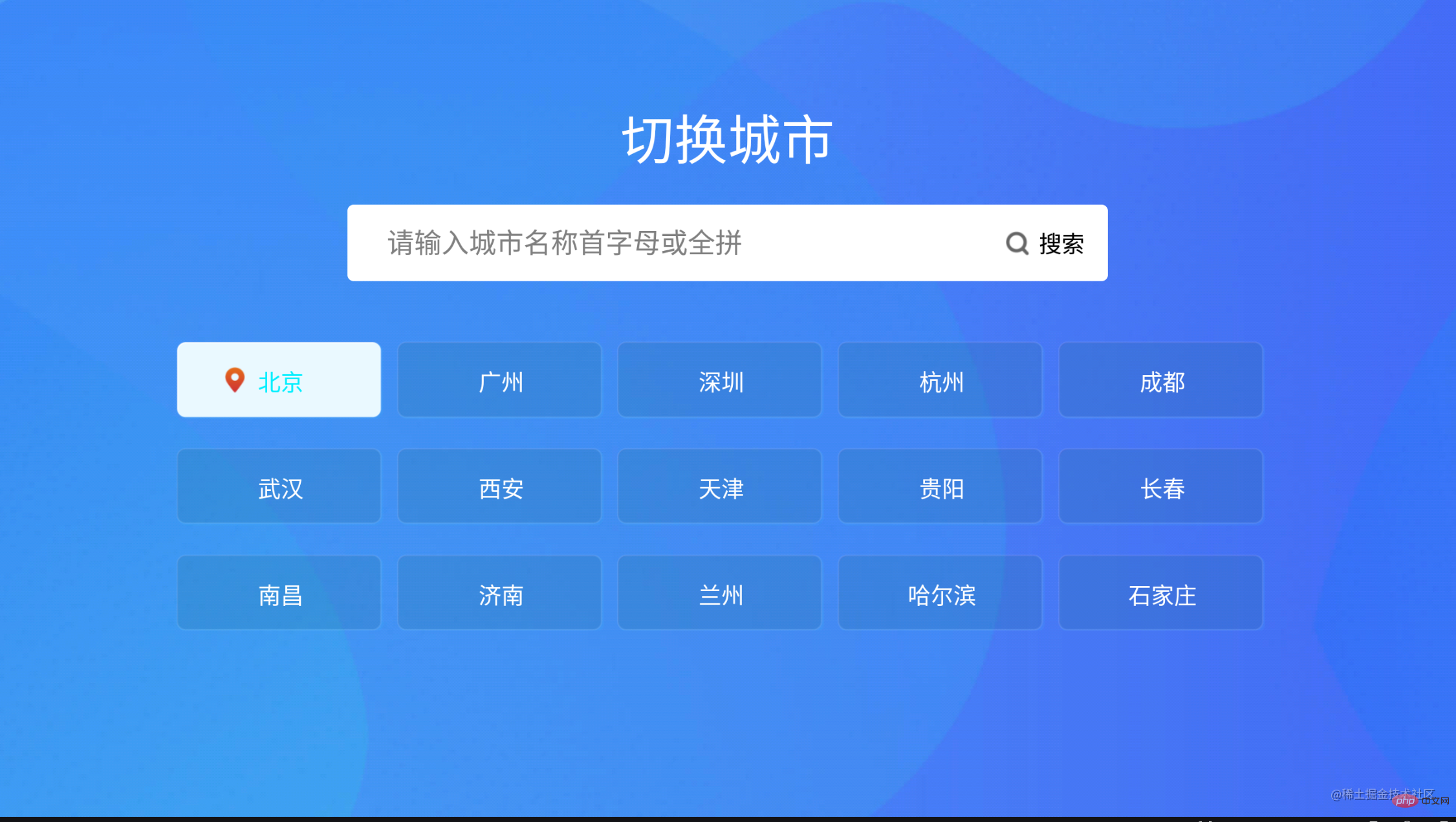
11.實現的效果截圖如下: